


 Track
Track
 Login
Login


I no longer use the mobile number displayed on the screen. How do I update my mobile number to receive the OTP?
Step 1: User press ‘YELLOW’ button to change mobile number.

Step 2: Scan the QR Code on your Ultra Box/Ulti Box using your mobile phone.

Step 3: Update your mobile number.
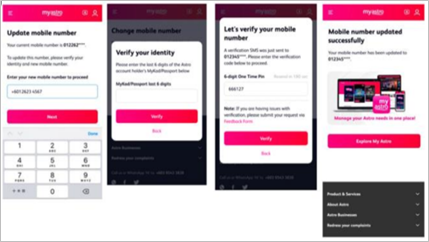
Step 4: Click on ‘Mobile number updated’ upon mobile number update completion and continue with OTP validation again.

Step 5: Once the mobile number has been successfully updated, please continue with the activation process.
Similar Articles

